
English
Install a client
Install the client on your computer or Android phone from a package file or in the mainland edition, then join it to your hub.
Before you start
- The device runs one of these systems:
- Linux with a desktop session: Debian 12 or newer, Ubuntu 22.04 or newer, Fedora 41 or newer, or the RHEL 9 family
- macOS 12.3 or newer
- Windows 10 1809 or newer on x86-64
- Android 8.0 or newer on a 64-bit ARM phone
- On a computer, you run the client from your own account, never as root.
- The device reaches the hub's port 8443, on your network or through a way in on Access.
Install the desktop client with one command
The install script checks the client package against the release's SHA256SUMS and installs it.
Linux and macOS
For the full edition, run:
bash
curl -fsSL https://github.com/iffiX/neutrino/releases/latest/download/install.sh | sh -s -- clientFor the mainland edition, run:
bash
curl -fsSL https://gitee.com/iffiX/neutrino/raw/main/packaging/install/install.sh | sh -s -- clientWindows
In PowerShell, run the command for your edition, then accept the administrator prompt. For the full edition:
powershell
& ([scriptblock]::Create((irm https://github.com/iffiX/neutrino/releases/latest/download/install.ps1))) clientFor the mainland edition:
powershell
& ([scriptblock]::Create((irm https://gitee.com/iffiX/neutrino/raw/main/packaging/install/install.ps1))) clientInstall the desktop client from the package file
Download the client's file from the releases page, or for the mainland edition from the Gitee releases page, then install it:
bash
sudo apt install ./neutrino-client_0.5.2_amd64.debbash
sudo dnf install ./neutrino-client-0.5.2-1.x86_64.rpmpowershell
msiexec /i neutrino-client-0.5.2-windows-amd64.msibash
sudo installer -pkg neutrino-client-0.5.2-macos-arm64.pkg -target /On 64-bit ARM Linux the file name says arm64 for the .deb and aarch64 for the .rpm. On an Intel Mac the file is neutrino-client-0.5.2-macos-amd64.pkg.
WARNING
dpkg -i and rpm -i install none of the dependencies. After either one, run sudo apt -f install on Debian, or sudo dnf install with the missing packages on Fedora and RHEL.
On Windows, opening the .msi from File Explorer runs the same installer. Its Add the Neutrino Client to PATH box puts the nclient command in every terminal.

On macOS, Gatekeeper asks for a confirmation the first time Neutrino Client opens.
Every package also installs the services for the virtual networks; the mainland edition's package joins EasyTier networks only.
Install the Android app
- On the phone, download
neutrino-client-0.5.2-android.apkfrom the release. - Open the file. If Android shows a prompt, allow your browser or file manager to install apps.
- Select Install.
- Open Neutrino.
The mainland edition's apk is on the Gitee releases page. It has no NetBird and joins EasyTier networks only.
Every release apk is signed with the project's key. To check a downloaded apk on a computer with the Android SDK build tools, run:
bash
apksigner verify --print-certs neutrino-client-0.5.2-android.apktext
Signer #1 certificate SHA-256 digest: 0e20b8b4542f329c4d3ed91632f3ea90730cb99472c46c31585780d046ee612d
...
Build tools 37 and newer print the line as V2 Signer: certificate SHA-256 digest:.
DANGER
If the digest differs, delete the apk without installing it.
Make a client link
- In the hub's panel, open Clients.
- Select New client link.
- Type a name for the device.
- Select Create link.
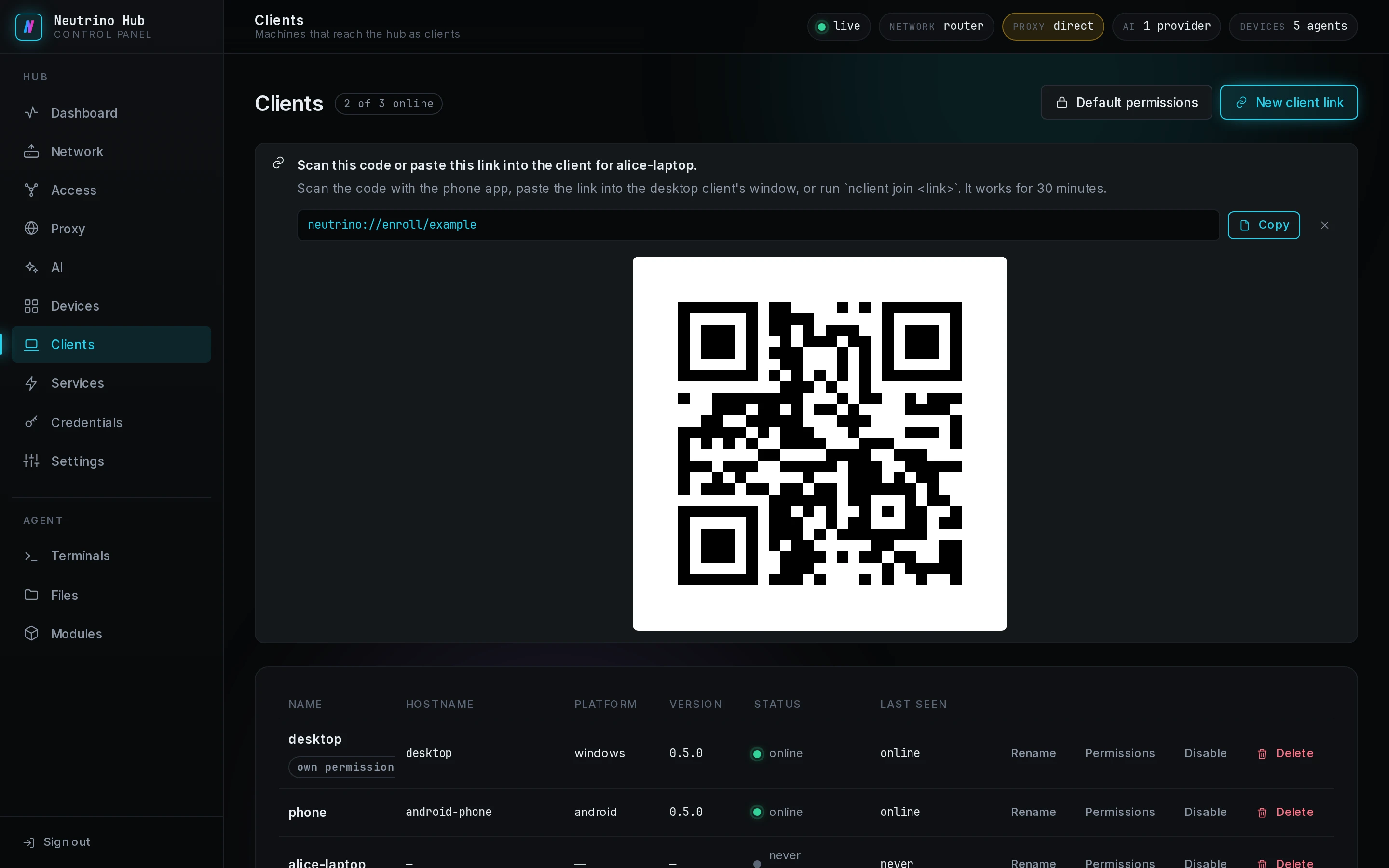
The notice shows the link, Copy, and a QR code of the same link. The link is valid for 30 minutes.
Creating another client link before this one is used makes this one stop working. Every link puts its row on Clients when you create it. The row of a replaced link never connects; remove it with Delete.
Join from a computer
- Open the client: Neutrino Client in the application menu on Linux or the Start menu on Windows, or the app on macOS. Hubs reads No hub joined yet.
- Paste the link into the field of the Join a hub row.
- Select Join.

The hub's row appears at once and reads Connecting…, then Connected · LAN or the name of another way in. In a terminal, nclient join '<client-link>' does the same, with the copied link in place of <client-link>. When the join fails, the cause is on Troubleshooting.
Join from a phone
- In the app, on Hubs, select Join a hub.
- Select Allow the camera, then allow it in Android's prompt.
- Point the camera at the QR code on the hub's Clients page.
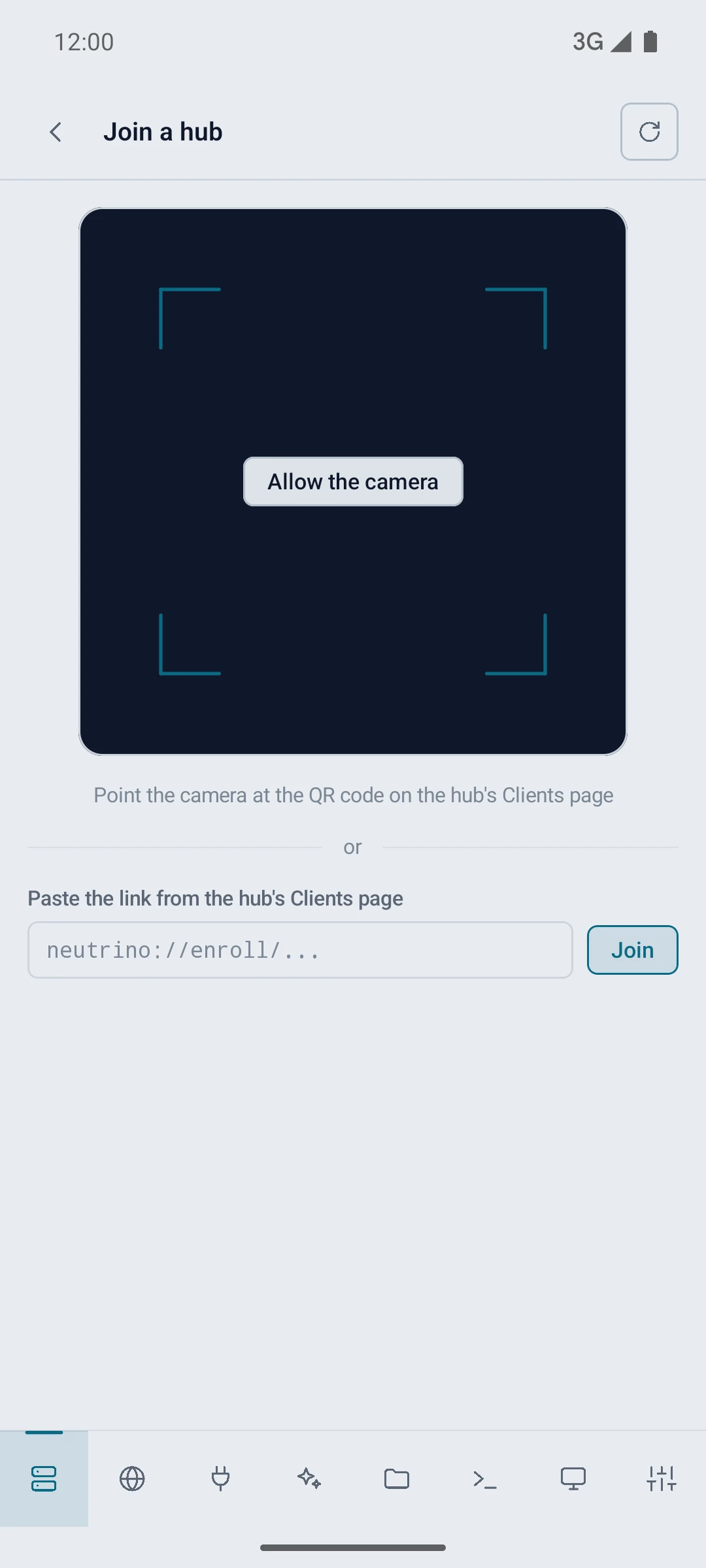
To paste the link instead, put it into the field under or and select Join. The hub's row reads Connecting… until the phone reaches the hub.
Android 13 and newer show a notification prompt at the first Open on Web, Connect on Ports or AI, or Panel on a hub row. With notifications allowed, the app shows one line there with the number of hubs it is connected to.
Join another hub
Make a client link in the other hub's panel, and join with it through Join a hub again. Each hub publishes its own services. One client, several hubs shows what the client lists once it has joined two hubs.