
English
Overview
Neutrino is a hub, the agents it manages and the clients that connect to the hub. This page shows where each one goes, first on one computer, then on several machines. A later section shows how a phone or a laptop reaches them from outside your home.
One computer
The hub and an agent install together on one computer that stays on. The agent runs the computer's services: terminals, AI sessions, an editor, the desktop and shared files. Your phone and your laptop each run a client. A client connects to one port of the computer, the hub's port 8443.
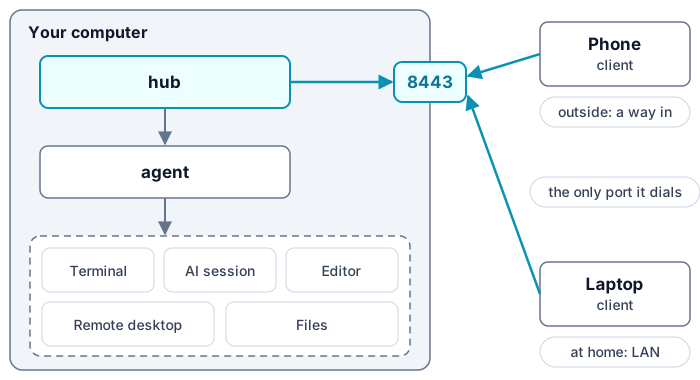
How a client reaches the computer's services
When you open a service, the client opens a port for it on the loopback address of your phone or laptop. A connection to that port goes over the client's one connection to port 8443. The hub passes it to the agent of the machine that runs the service. Port 8443 is therefore the one port the computer opens to clients.
Several machines
Each further machine at home gets an agent of its own, and that agent connects to the hub's port 8443. The machine's services then appear in the clients beside the first computer's. A client still connects to the hub alone, so it reaches every machine through that one port.
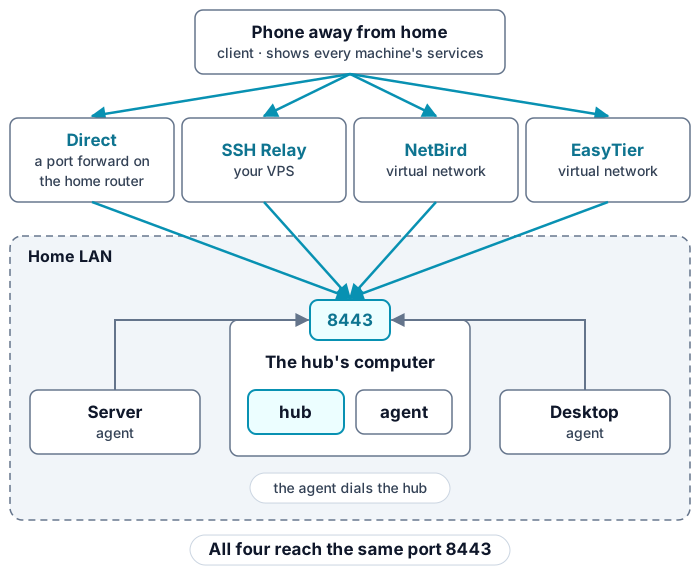
The hub's Clients page sets which machines and which kinds of service each client can open.
Reaching home from outside
At home, a client reaches the hub over your network. From outside, it uses a way in:
- Direct needs a public IPv4 or IPv6 address at home and a port forward to port 8443 on the home router.
- SSH Relay needs a server with a public address that you run, such as a rented VPS. Its public port leads to port 8443.
- NetBird needs an account with a NetBird management server, such as netbird.io. The mainland edition leaves it out.
- EasyTier needs an account on an EasyTier console, or the address of a machine already on your EasyTier network.
Several ways in can be on at once, and a client uses whichever one reaches the hub. Choose a way in compares them for your home.
The parts and the hub's layers
| Part | Installs on | Does |
|---|---|---|
| Hub | one computer that stays on, with Linux, macOS or Windows | runs the panel on ports of its own, accepts agents and clients on port 8443, and publishes services |
| Agent | each machine that runs services, the hub's own computer among them | installs the modules the panel turns on, and runs terminals and the desktop |
| Client | your laptop with Linux, Windows or macOS, or your Android phone | opens what the hub publishes to it, at home and from outside |
The hub itself has layers, and each one is set on its own panel page:
| Layer | What it does |
|---|---|
| Mode | Places the hub's computer in your network. Server runs on every system, Router on Linux, and Side gateway on Linux in the full edition. |
| Access | Turns on the ways in from outside: Direct, SSH Relay, NetBird and EasyTier. |
| Proxy | Sends chosen traffic through exit nodes: the hub's own, and in Router and Side gateway that of the devices behind it. Full edition only. |
| AI gateway | One address in front of your API keys and subscriptions, for the AI tools on every machine and client. |
Network describes each mode and how to change it. Security explains why the hub runs as root, where it keeps your keys, and what Direct opens.