
English
VS Code
The VS Code module gives each account on a managed machine its own VS Code in the browser. You install VS Code Server on the machine under Microsoft's license terms, at one pinned build of Microsoft's standalone VS Code CLI, and the agent runs it.
| System | Machines that run it |
|---|---|
| Linux | amd64 and arm64 |
| Windows | amd64 |
| macOS | Apple silicon and Intel |
Accept the terms and install
- On the VS Code tab of the Modules page, select Open and accept the terms. Microsoft's terms open in a new browser tab, and the press records your acceptance for this machine.
- Select Install.
- Select Configure. The Instances section opens under the tab.
After the first step the button reads Terms accepted. Until then the hub rejects an install, a start or a configuration of VS Code on that machine.
Add an instance
- Under Instances, select Add instance.
- Fill Account with the name of an account on the machine.
- Optional: change the Port. The first instance gets 8000.
- On a Windows machine, pick the account's login under Windows login for the account.
- Select Apply VS Code.
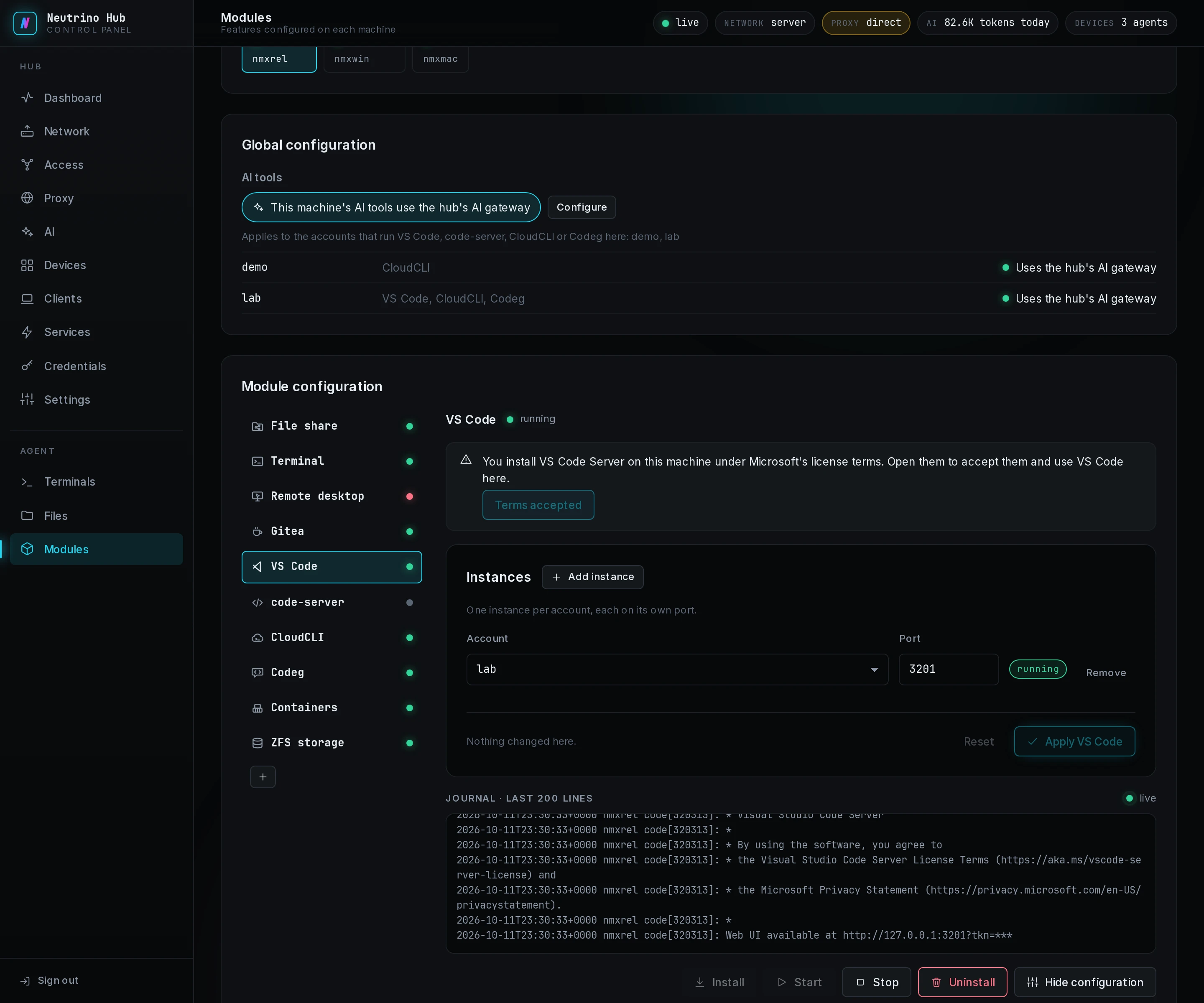
Each instance runs as its account, so the files it creates belong to that account. Its row reads running or not running, with a reason when the machine reports one. A refused apply names its code, listed under VS Code in troubleshooting.
On Windows, an instance starts only with its account's password. Store the username and password under Logins on the Credentials page, then pick that login. After the password changes on Windows, update the login and select Apply VS Code again.
Open it from a client
Each running instance is a row under Web on the Services page, titled VS Code with the account in parentheses. The instance listens on its machine's loopback alone, so a client opens it with Open on its Web page. Its account's AI tools follow the machine's setting in Point a machine's AI tools at the gateway.
Ports
Port is the port the instance listens on, at 127.0.0.1 on its machine. It is a number from 1024 to 65535, and no two instances on a machine share one. Add instance offers the port after the highest one in use. The hub publishes that port as the instance's Web entry, and the client forwards the entry to a port of its own.
A program you start inside the editor, such as a development server on port 3000, gets no entry. The agent connects a client only to the ports its machine publishes, and the instance's port leads to the editor alone. To open it from a client, declare a Web or Port service with the machine's address and the program's port on the Services page. The hub dials that address itself, so the program must listen on an address the hub reaches, such as 0.0.0.0.