
English
Point a machine's AI tools at the gateway
One setting per managed machine sends the requests of Claude Code, Codex and Gemini to the hub's AI gateway. It acts on every account that runs VS Code, code-server, CloudCLI or Codeg on that machine.
Before you begin, the hub's AI page must serve at least one model. Each account to switch needs an instance of VS Code, code-server, CloudCLI or Codeg on the machine.
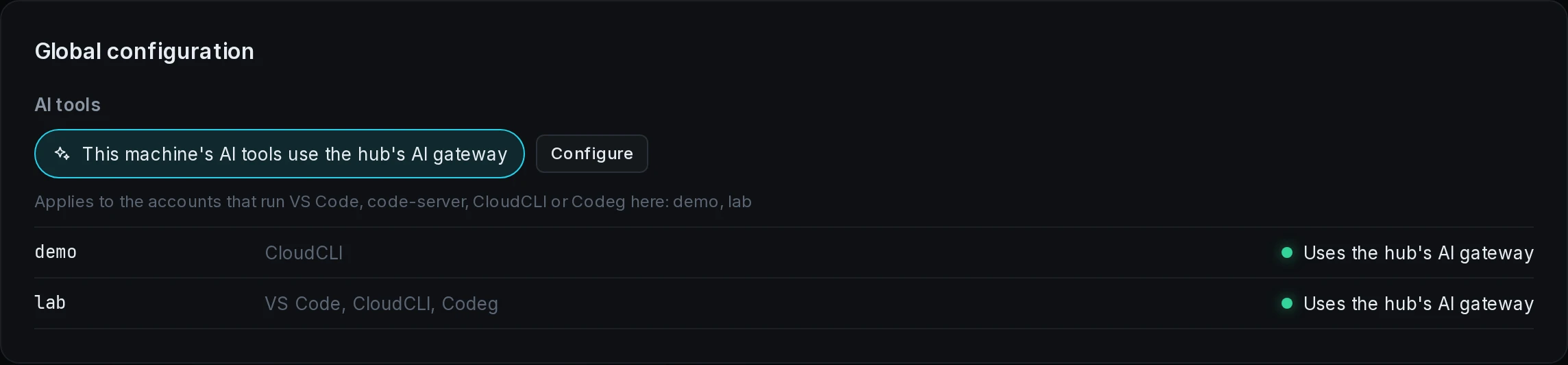
Turn it on
- Open the Modules page.
- Under Which machine, select the machine.
- Under Global configuration, select This machine's AI tools use the hub's AI gateway.
The press takes effect at once, with no apply bar. The control is greyed while the agent is offline, and while the gateway serves no model. The first time a machine uses the setting, its agent fetches cc-switch from the hub, the program that rewrites each tool's settings.
Choose the models
- Under Global configuration, select Configure.
- Under Claude Code, pick a model for Default model, Opus slot, Sonnet slot and Haiku slot.
- Under Codex, pick the Model and the Reasoning effort.
- Under Gemini, pick the Model.
- Select Save.
Every picker offers gateway default, which leaves that choice to the gateway.
Which accounts it acts on
The line under the control names the accounts with an instance in the machine's VS Code, code-server, CloudCLI or Codeg configuration. Each row shows the account, its modules and its result:
| Result | The account's tools |
|---|---|
| Uses the hub's AI gateway | send their requests to the gateway |
| Uses its own settings | use the settings they had before the switch |
| a red dot and the failure's words | were not switched |
| Waiting for the agent to report. | have not been reported on yet |
An account that gets an instance later is switched at that point. The agent runs cc-switch with a store of its own in each account's Neutrino folder, so the account's own ~/.cc-switch stays as it was.
Turn it off
Select the control again. The agent switches every account back, and each file the switch changed, such as ~/.claude/settings.json, is written back byte for byte.
The control reads on while any account still points at the gateway, including one whose switch back failed, and a press then tries again. The agent also switches an account back when its last instance is removed, when the machine leaves the hub, and when the agent is uninstalled.
To try a failed switch again, turn the setting on again, or off and on when it already reads on. The failures are listed under AI tools in troubleshooting.
A computer that also runs the client
On a computer with both the agent and the desktop client, the client's AI page is greyed and reads This is a managed device: set its AI tools on the hub's panel, under Modules, Global configuration. If the client had pointed the tools at the gateway, it switches them back one time. Desktop client covers the AI page on a computer without the agent.